How to Photograph Candles and Fire at Night on a Smartphone Without Overexposing
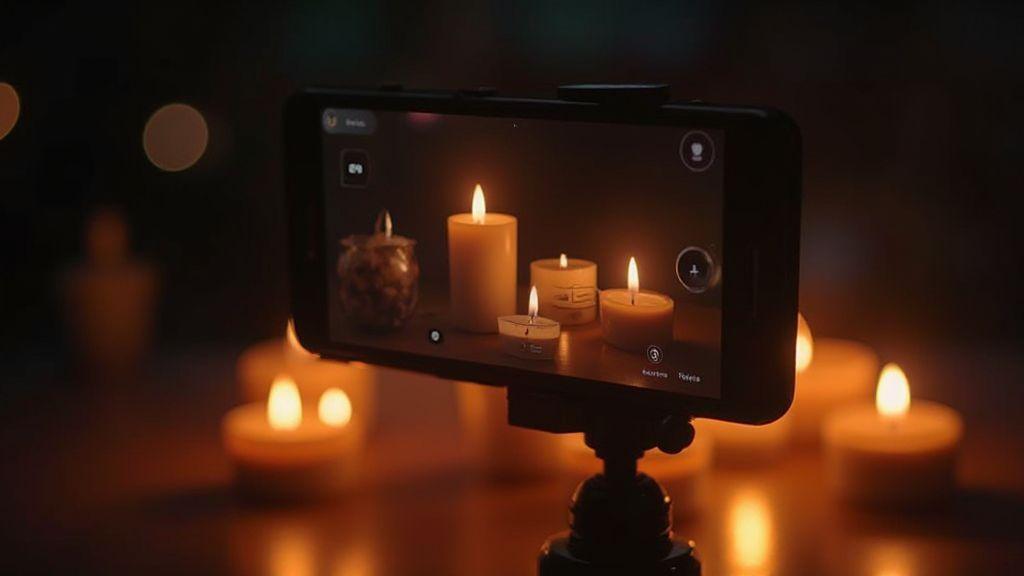
In this guide, you’ll learn practical, hands-on steps to control exposure when shooting candles and fire with a smartphone. The aim is simple: keep the flame bright but not blown out, preserve texture, and keep the surrounding room visible for mood.
Manual exposure: core smartphone tips
- ISO and shutter speed for candles
- Start with a low ISO (100–200) to minimize grain. If the image is too dark, raise ISO in small steps. For candles, a shutter around 1/60–1/125s gives steady flames; if the flame flickers a lot, try 1/125–1/250s to freeze motion. Test a frame and adjust; let ISO be your last helper.
- Use exposure feedback: if the flame looks chunky or blown out, drop ISO or slow the shutter; if the scene is too dim, raise ISO first, then adjust shutter.
- Use exposure compensation for fire
- If the flame is underexposed, 0.3 to 1 stop can help. If the flame is too bright and flat, -0.3 to -1 stop preserves texture. Exposure compensation affects the whole image; shoot RAW if available to adjust later with less noise.
- Quick manual exposure checklist
- Set ISO 100–200 for clean shadows
- Shutter 1/60–1/125s for steady flames; adjust if needed
- Use exposure compensation to protect flame brightness (0.3 to 0.7)
- White balance: keep candle color warm
- Review multiple frames; adjust ISO/shutter/EV to balance flame and room
- If available, shoot RAW for flexible edits
Reducing highlights and saving flame detail
- Bright parts can blow out. Lower ISO and faster shutter help preserve flame texture and edge detail.
- On a smartphone, tap to focus and drag exposure slider; lock exposure briefly to keep glow stable.
- RAW helps recover highlights later; if not available, rely on small exposure tweaks and check the histogram to protect both flame and surroundings.
- Take a few shots at slightly different exposures to compare glow and shape.
Spot metering and exposure control
- Spot metering the flame measures the brightest part, preventing washout elsewhere.
- If the flame blows out, reduce exposure a notch and reframe so the tip isn’t in the brightest spot.
- Lock exposure after metering to prevent drift as you reframe or the flame flickers.
Lower EV and bracketing
- Lower EV (-1 EV to -1.7 EV in small steps) helps keep highlights from clipping while preserving wax texture.
- Bracketing (normal exposure, -1 EV, 1 EV) gives a range for post-blend: you can combine to keep both glow and detail.
Shoot RAW and edit safely
- RAW preserves more detail in shadows and highlights; use RAW if your app supports it.
- Use a tripod or steady surface; protect highlights first, then adjust.
- Edit with restraint: keep warmth natural, recover shadows, and tame highlights without introducing noise.
- Check color balance; ensure the flame looks natural and the background reads properly.
Shoot RAW candle photos for headroom
- Shoot with RAW and slightly underexpose so the flame remains the brightest part.
- Use exposure compensation to protect the flame; keep room detail readable.
- Watch for over-sharpening and halos; balance sharpening with noise management.
Edit to recover shadows and tame highlights
- Start with highlights: reduce exposure slightly to recover flame detail.
- Adjust white balance toward neutral if the flame looks too pink or too orange.
- Lift shadows gradually to reveal texture in the holder and surroundings without flattening the image.
- Tweak contrast and texture to keep the glow vivid without harsh edges.
- Fine-tune color; a touch of green/m magenta can correct color casts without cooling or overheating the scene.
- Consider a light vignette to focus attention on the flame if the background is busy.
Export settings after RAW edits
- Export smaller JPEG/TIFF for web; keep a lossless TIFF or PSD with layers for archiving.
- Use sRGB for online sharing; for print, consider Adobe RGB and convert later.
- Rename files descriptively and save notes with exposure and WB settings for future shoots.
Stabilization and shutter speed decisions
- Warm up the scene with a steady setup: tripod or stable surface yields clean results.
- Typical handheld: start at 1/60–1/125s; if motion remains, move to 1/250s.
- On a tripod: you can go slower (1/8–1/4s) for ambient mood, but keep ISO low to avoid noise.
- Lock focus on the flame and use exposure compensation sparingly to protect highlights.
- If color shifts occur, adjust white balance.
Tripod or steady surface for low-light candle photography (smartphone)
- A tripod provides the cleanest, repeatable results. Frame, lock focus, and expose with care.
- If no tripod, use a stable surface (shelf, books, rock) and a remote shutter or timer to avoid shake.
- A steady setup makes color, exposure, and texture easier to control.
ISO and shutter speed for candles to cut noise
- Start at ISO 100–200; the lower the ISO, the less noise, which means you may need a longer shutter or a steadier hold.
- If you need faster shutter for less motion blur, raise ISO but avoid excessive noise (400–800 is a common ceiling).
- Balance ISO and shutter speed: keep the flame crisp and the room readable.
Handheld vs. tripod shutter guide
- Handheld: keep shutter above 1/60s for close-ups; 1/125s–1/250s if needed for movement or detail.
- Tripod: you can drop shutter to 1/8s–1/4s for ambient mood, but keep ISO low to prevent noise.
- Always lock focus on the flame, and use exposure compensation to protect the brightest parts.
White balance, color, and mood control
- White balance sets the mood: amber warmth is natural for candlelight; adjust Kelvin to keep skin tones and flame believable.
- Subtle color adjustments can preserve texture in wax and glow in the surroundings without making the scene look fake.
- Watch for neon or house-light tints; aim for a natural balance with warm tones.
- Set custom white balance for photographing candles at night
- Start with tungsten/incandescent presets, then fine-tune with Kelvin. If the image is too orange, push WB cooler; if too blue, warm it slightly.
- Use live view to preview color shifts and compare several frames quickly.
- Compare to a white/gray surface to verify color accuracy; keep WB consistent across sequences.
Fix candle tint in apps while keeping warmth
- If editing introduces a tint, adjust color balance or tint sliders to counter yellow or excessive green.
- Use targeted adjustments to brighten the flame slightly more than surrounding shadows.
- If available, use warmth controls modestly to preserve candle glow without making everything look overly toasty.
Keep colors natural without overcorrection
- Avoid aggressive saturation that makes wax look fake or flames look cartoonish.
- Make small, deliberate adjustments and compare to the real scene.
- Trust your eye; if it feels off, revert and try again.
How to Photograph Candles and Fire at Night on a Smartphone Without Overexposing
You’ll optimize by keeping the flame bright but not blown out, while still revealing the room’s mood. Balance shutter speed, ISO, and stabilization, then test a few frames to compare results. A steady hand or a tripod helps you capture warmth and texture without turning the flame into a white dot.
Apps and techniques for fire photography on a smartphone without overexposing
- Look for manual exposure, focus peaking, and RAW support in apps.
- Metering options help you gauge whether the scene is too bright or dark.
- Start in a low-contrast scene and progress to more challenging lighting as you gain confidence.
- Combine a steady setup, a soft timer, and balanced exposure to keep flame texture while keeping surroundings visible.
How to Photograph Candles and Fire at Night on a Smartphone Without Overexposing using manual apps
- In a manual app, set a low ISO, modest shutter, and small aperture if available.
- Lock exposure on the flame tip to prevent drift during framing.
- Use manual focus on the flame edge for depth; check the histogram to minimize clipping.
- White balance matters: set a warmer tone to preserve glow; compare with a neutral reference for color accuracy.
- Switch between manual and auto modes to learn which helps control highlights best in different moments.
Use exposure lock, metering, and histogram to reduce highlights
- Exposure lock stabilizes brightness on a key detail (usually the flame tip or glow).
- Pair exposure lock with suitable metering (spot on the flame or center-weighted for balance).
- Use the histogram to avoid clipping: adjust exposure if the right side peaks or if the left side is too dark.
Quick app and tool checklist
- Manual app with exposure, focus, and RAW support
- Exposure lock and metering modes
- Histogram viewer for quick highlight safety checks
- Tripod or stable surface
- Remote shutter or timer to avoid shake
- White balance controls for warm, natural candle glow
- Low ISO with manageable shutter speed
- Soft, dim ambient lighting to preserve mood
If you keep these steps in mind, you’ll master photographing candles and fire at night on a smartphone without overexposing, capturing warm glow, texture, and mood with confidence.

Smartphone Night Photography Enthusiast & Founder of IncrivelX
Vinicius Sanches is a passionate smartphone photographer who has spent years proving that you don’t need an expensive camera to capture breathtaking images after dark. Born with a natural curiosity for technology and a deep love for visual storytelling, Vinicius discovered his passion for night photography almost by accident — one evening, standing on a city street, phone in hand, completely mesmerized by the way artificial lights danced across wet pavement.
That moment changed everything.
What started as a personal obsession quickly became a mission. Vinicius realized that millions of people were carrying powerful cameras in their pockets every single day, yet had no idea how to unlock their true potential after the sun went down. Blurry shots, grainy images, and washed-out colors were robbing everyday people of memories and moments that deserved to be captured beautifully.
So he decided to do something about it.
With years of hands-on experience shooting city streets, starry skies, neon-lit alleyways, and creative night portraits — all with nothing but a smartphone — Vinicius built IncrivelX as the resource he wished had existed when he was just starting out. A place with no confusing jargon, no assumptions, and no gatekeeping. Just honest, practical, beginner-friendly guidance that actually gets results.
Vinicius has tested dozens of smartphones from every major brand, explored dark sky locations across multiple states, and spent countless nights experimenting with settings, compositions, and editing techniques so that his readers don’t have to start from scratch. Every article on IncrivelX comes from real experience, real mistakes, and real lessons learned in the field.
When he’s not out shooting at midnight or writing in-depth guides for the IncrivelX community, Vinicius can be found exploring new cities with his phone always within reach, looking for the perfect shot hiding in the shadows.
His philosophy is simple: the best camera is the one you already have — you just need to learn how to use it in the dark.