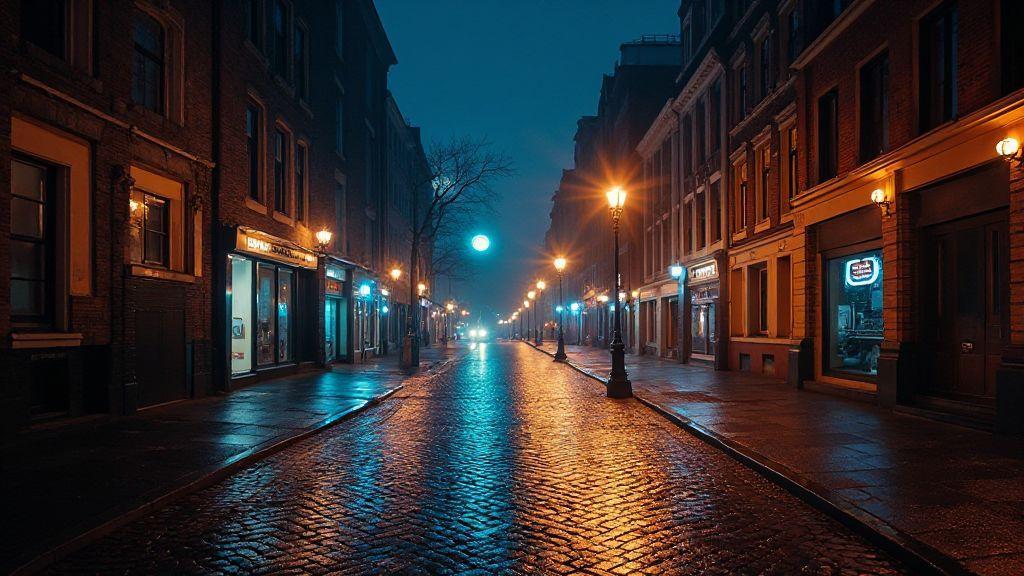
Recovering Shadow Detail in Night Photos Without Blowing Highlights: 2026 Methods
Recovering Shadow Detail in Night Photos Without Blowing Highlights: 2026 Methods
This guide compiles practical, up-to-date techniques for preserving highlight detail while revealing shadow texture in night photography. The strategies below are designed to work together, so you can recover shadow detail without sacrificing the glow of lamps, signage, or reflections. These methods are core to Recovering Shadow Detail in Night Photos Without Blowing Highlights: 2026 Methods.
Meter and Shoot to Avoid Blown Highlights
Meter first to guide exposure, especially with bright neon, street lamps, or car headlights. Use highlight alerts or zebras if available, aiming for bright areas that read on the screen but don’t clip in the histogram. Bias exposure toward darker zones when necessary to retain highlight texture, possibly nudging shutter speed or ISO just enough to prevent clipping. Test a conservative exposure, a slightly darker shot, and a slightly brighter shot to tune the balance between highlights and shadows before committing.
Use spot and matrix metering to prevent blown highlights night photography
Spot metering protects hotspots (storefronts, lamps) from clipping, while matrix metering keeps overall exposure balanced. Lock highlights with spot metering, then verify shadows with matrix metering and apply exposure compensation as needed. This approach preserves bright detail first and lets RAW processing recover shadow texture later. Practice on city corners with neon to sense how far you can push without clipping.
Bracket RAW frames to recover shadow detail night photos
Bracket RAW frames by capturing three exposures: standard, darker for highlights, and brighter for shadows. When blended or compared, you gain data across the tonal range, especially in busy scenes with bright signage and deep shadows. RAW offers more latitude than JPEG, so you can recover texture in shadows and retain highlight detail. Save bracketing for scenes with wide light ranges.
Capture RAW to keep highlight and shadow data
RAW preserves the most information, enabling better highlight recovery and shadow lifting without excessive noise. A consistent RAW workflow smooths white balance, contrast, and texture edits later.
RAW Processing Techniques for Shadows
RAW processing lets you lift shadow detail while preserving mood and texture. Start subtle, compare adjustments, and avoid overprocessing. Subtle, precise edits reveal brick texture, window reflections, and night textures without flattening the scene. Use real-world examples—neon storefronts, alley textures, and night skies—to guide the balance.
Lift shadows with raw processing techniques for shadows
Begin with a gentle exposure or shadows lift, then refine with contrast to keep edges crisp. Watch noise, especially in skin, fabric, or brick, and apply light denoise as needed. Use masks to confine the lift to areas that need it, and feather edges to prevent halos. Small, targeted adjustments on walls, trees, and foreground objects often yield the most believable results. Pair a touch of clarity or texture with the lift, but stay light to preserve depth.
Use highlight recovery to protect bright areas and prevent blown highlights night photography
Pull back exposure on the brightest regions or use a highlight slider to reclaim detail. Avoid over-saturation in neon colors by desaturating gently or adjusting white balance in the brightest zones. Compare results across displays to ensure consistency.
Exposure Blending and HDR for Night Images
Exposure blending and thoughtful HDR can keep lamps glowing while maintaining sky and architectural detail. Shoot a quick bracket (dark, mid, bright) and merge to balance shadows and highlights. Align frames to avoid ghosting, then use masks and color balancing to maintain natural tones. Test different HDR densities to keep stars crisp and street lamps glowing without an artificial look.
Merge brackets for exposure blending for night images
Align frames, then blend, masking any sky banding or misaligned areas. Watch color consistency to avoid warm/cool mismatches in the sky or lamp glow. After merging, check for haloing and smooth with a feathered mask. Save and compare against the bracket set to ensure you preserved essential glow.
Apply HDR night photography for shadow detail with careful tone mapping
Tone map with care to preserve native contrast. Lift shadows subtly to reveal texture in buildings and streets without washing out highlights. Use gradual transitions and mild noise reduction in dark areas. Maintain color fidelity to prevent neon greens and tungsten tones from clashing.
Merge brackets for exposure blending for night images (continued)
When ready, merge three frames and adjust color balance to maintain a cohesive look. Compare the blended result to single-shot frames to ensure realism.
Local Tone Mapping and Luminance Masks
Local tone mapping and luminance masks help pull out detail in bright city lights while protecting shadows. Brighten dark corners without exploding window highlights; mask by brightness level to treat shadows and midtones separately. Subtle, deliberate adjustments keep the night mood intact and avoid overcooked results.
Use local tone mapping for night photography to bring out detail
Identify flat or muddy regions (storefronts, alleys) and apply targeted local tweaks. Keep halos at bay by adjusting radius and strength. Compare before/after in small steps to preserve a faithful night mood.
Build luminance masking for shadow recovery to target dark areas
Create brightness-based masks to recover shadows without lifting the entire image. Watch for noise; reduce push if grain appears. Keep edits targeted to textures in walls, sidewalks, and faces for believable depth.
Soften mask edges to avoid halos
Feather mask edges to blend changes smoothly. If halos persist, reduce adjustment strength near edges or refine feathering. Practice with strong lighting and subtle shadows to achieve cohesive results.
Noise Reduction While Preserving Highlights
Preserve highlight glow while reducing noise in dark areas. Start gently and increase only where needed. Compare side-by-side and watch for haloing around bright edges. Use masking to protect highlights during noise reduction in shadows. If crops show smeared texture, back off and refine selectively. The goal is invisible noise reduction that preserves glow and texture.
Apply noise reduction while preserving highlights in shadow zones
Protect bright areas while smoothing dark zones, using masks to localize the adjustment. Monitor histograms to avoid clipping in highlights.
Use spatial and temporal denoise for long exposures and low light
Apply spatial denoise first, then temporal denoise to stabilize across frames. Be mindful of texture in repeated patterns; dial back if artifacts appear. Check 100% crops to ensure texture remains.
Check 100% crops to keep texture while reducing noise
Zoom to 100% on critical areas to confirm texture remains. If texture is lost, reduce strength or adjust masking. Small, careful tweaks beat heavy-handed changes.
Selective Dodging and Burning for Night Photos
Selective dodging and burning shapes light precisely where you want it, lifting shadow detail while preventing highlight clipping. Target midtones first, then adjust shadows and highlights to balance the scene. Use small brush adjustments with low opacity, and feather transitions to avoid obvious edits.
Use selective dodging and burning for night photos to shape light
Paint light where it belongs—streetlamp glow, window reflections, or sky highlights—while preserving mood. Editor focus is on natural, intentional light, not broad, indiscriminate brightening.
Dodge midtones and shadows, burn bright lights to stop clipping
Dodge midtones to reveal texture; burn overly bright areas to control clipping. Keep changes subtle; if a highlight remains harsh, adjust surrounding areas to distribute light more evenly.
Curves, Levels and Local Contrast Controls
Curves, levels, and local contrast unlock hidden detail in shadows and prevent flat night tones. Start with a clean histogram, raise shadows slightly, and keep midtones smooth to avoid noise. Use levels as a safeguards for blacks, whites, and midtones to preserve color and texture across the frame. Enable clipping warnings to stay within recoverable limits.
Use curves to recover shadow detail night photos without clipping
Lift shadows subtly with a gentle S-curve, and ensure lines don’t clip at either end. Small adjustments reveal brick, foliage, and skin texture without destroying the overall balance.
Adjust levels to protect whites and keep natural tonality
Set true blacks and preserved whites, then tune midtones for natural color. Balance prevents color shifts and keeps night colors consistent.
Turn on clipping warnings while you tweak tones
Clipping warnings help you avoid pushing pixels beyond recovery, keeping a natural look.
Exporting and Sharing Without Losing Shadow Detail
Export with settings that retain shadow texture while preserving mood. Choose formats and compression that respect shadow data; embed color profiles and preview on target devices to ensure consistency. A repeatable export workflow helps maintain the same look across a portfolio.
Choose file formats and bit depth that preserve shadow data
Prefer 16-bit TIFF or high-quality 12-bit JPEG where needed. RAW isn’t ideal for sharing, but 16-bit TIFF preserves shadow detail for archiving. Avoid aggressive compression that causes banding.
Compress for web but avoid crushing dark tones when you share
Use high-quality JPEG (70–85%) with perceptual or visually lossless options when possible. Gentle sharpening after export helps counteract compression blur without introducing halos. If needed, switch to high-quality PNG for some shots to preserve deep shadows.
Embed color profile and preview on target device
Embed ICC profiles and preview on phones, tablets, and monitors to catch tint shifts early.
Workflow, Presets and Automation for Night Edits
A repeatable workflow speeds night editing and preserves shadow detail. Use starter presets for contrast, exposure, and color balance, then batch process RAW files with non-destructive edits. Save adjustments as a master preset to reuse later and set up automation to run core steps (luminance tweaks, noise reduction, color corrections) across folders.
Use presets and batch processing to repeat shadow recovery techniques for low light
Create a shadow lift preset with selective sharpening, then apply to multiple frames. Pair with a lightweight luminance mask to protect highlights, and override as needed for unique glare.
Combine luminance masking, exposure blending, and raw fixes in a single workflow
Integrate masking, blending, and RAW adjustments into one smooth pass. Keep masks lightweight to protect stars and reflections. Apply minor sharpening and noise control at the end to maintain realism.
Keep a non-destructive master file so you can re-edit later
Always save a non-destructive master with all edits intact, so you can revisit and revise after new techniques emerge.
This compilation of Recovering Shadow Detail in Night Photos Without Blowing Highlights: 2026 Methods provides a streamlined, practical path to balance highlights and shadows in night scenes. By combining meter/shoot discipline, RAW strategies, HDR/ blending, local adjustments, selective dodging and burning, and a repeatable workflow, you’ll produce night photos that feel natural, detailed, and vibrant across devices.

Smartphone Night Photography Enthusiast & Founder of IncrivelX
Vinicius Sanches is a passionate smartphone photographer who has spent years proving that you don’t need an expensive camera to capture breathtaking images after dark. Born with a natural curiosity for technology and a deep love for visual storytelling, Vinicius discovered his passion for night photography almost by accident — one evening, standing on a city street, phone in hand, completely mesmerized by the way artificial lights danced across wet pavement.
That moment changed everything.
What started as a personal obsession quickly became a mission. Vinicius realized that millions of people were carrying powerful cameras in their pockets every single day, yet had no idea how to unlock their true potential after the sun went down. Blurry shots, grainy images, and washed-out colors were robbing everyday people of memories and moments that deserved to be captured beautifully.
So he decided to do something about it.
With years of hands-on experience shooting city streets, starry skies, neon-lit alleyways, and creative night portraits — all with nothing but a smartphone — Vinicius built IncrivelX as the resource he wished had existed when he was just starting out. A place with no confusing jargon, no assumptions, and no gatekeeping. Just honest, practical, beginner-friendly guidance that actually gets results.
Vinicius has tested dozens of smartphones from every major brand, explored dark sky locations across multiple states, and spent countless nights experimenting with settings, compositions, and editing techniques so that his readers don’t have to start from scratch. Every article on IncrivelX comes from real experience, real mistakes, and real lessons learned in the field.
When he’s not out shooting at midnight or writing in-depth guides for the IncrivelX community, Vinicius can be found exploring new cities with his phone always within reach, looking for the perfect shot hiding in the shadows.
His philosophy is simple: the best camera is the one you already have — you just need to learn how to use it in the dark.