Night Mode vs Long Exposure Mode: When to Use Each on Your Phone in 2026
Night Mode vs Long Exposure Mode: When to Use Each on Your Phone in 2026
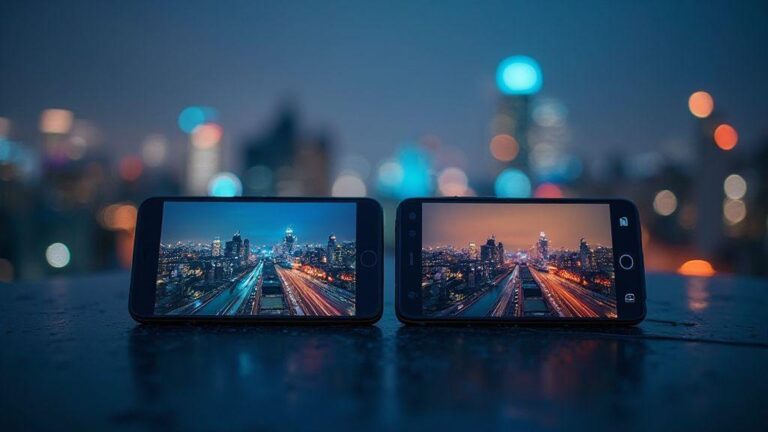
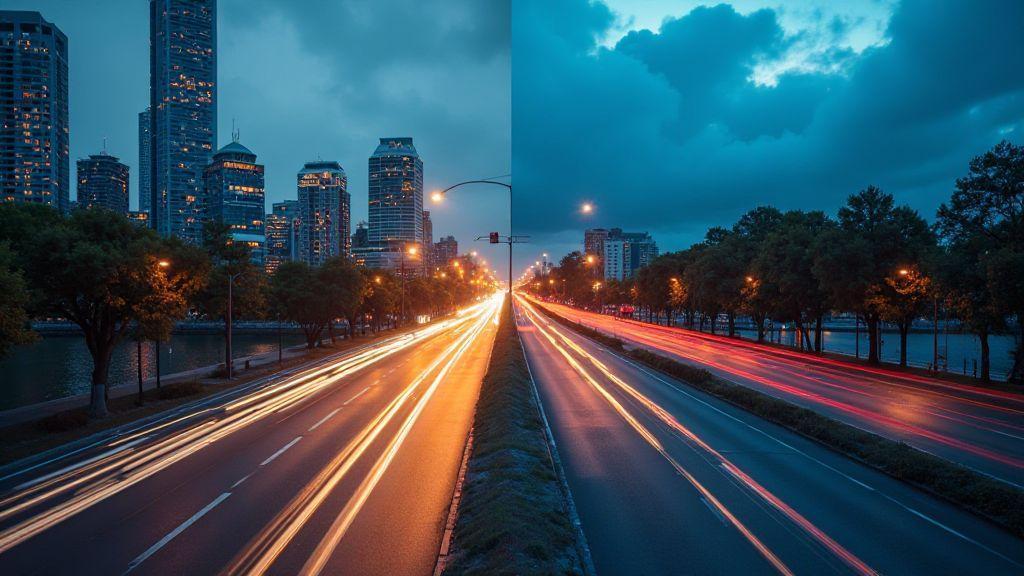
In 2026, two essential tools help you nail low-light and motion shots on your phone: Night Mode and Long Exposure. They’re not the same, and choosing the right one changes the mood, texture, and storytelling of your photo. Night Mode brightens shadows and cuts noise, while Long Exposure creates smooth motion trails and crisp stills by stretching time. Think of them as two different ways to tell a story with light: Night Mode freezes the darkness, Long Exposure paints movement.
You’ll use Night Mode for dim rooms or dusky scenes where you want detail without chaos. It’s fast, forgiving, and noise-reducing. Long Exposure shines when you want to turn rivers into silk, create light trails from cars, or emphasize motion. It takes a moment longer to capture, but the result can be dramatic and cinematic. The goal is to match the mood: crisp, bright, and natural with Night Mode; flowing, artistic motion with Long Exposure.
If you’re new to this, start with Night Mode for everyday low-light shots. Then try Long Exposure on a quiet night with a tripod or solid steadiness to capture moving subjects. Night Mode is your friend for dark scenes; Long Exposure is your friend for motion and drama. Practice helps you learn which mode fits the moment.
What each mode does for you
- Night Mode brightens dark scenes by stacking multiple frames and reducing noise. Your photos look clearer with more detail in shadows, often with natural color. It’s great for indoor gatherings, streetlights, and scenes where detail matters.
- Long Exposure keeps the shutter open longer to capture motion. Move a light and you’ll see trails; keep a subject still and you’ll get a sharp image with motion in the background. A stable stance or tripod is usually needed, as shake shows up as blur. It’s perfect for flowing water, light trails, and dramatic motion.
In the same scene, Night Mode reduces noise and boosts brightness, while Long Exposure adds intentional blur where you want it. Your choice sets the story: clean detail or painterly, dynamic motion. Practice helps you learn where each mode shines.
When you should pick one
- Night Mode: when the subject is stationary or moves slowly and you want clarity. Ideal for indoor lamps, dim street corners, and scenes where natural skin tones and sharp edges matter with minimal effort.
- Long Exposure: when motion is the point. Use it for silky water, light trails, or cars streaking by at night. It’s best on scenes with deliberate movement and a cinematic feel; stabilize the shot for the cleanest result.
If you’re unsure, test both in the same scene. Night Mode preserves detail; Long Exposure exaggerates movement. Your instinct will grow with practice, so don’t be afraid to experiment.
Key technical differences
- Night Mode uses shorter, stacked exposures with noise reduction to brighten shadows while preserving color. It blends frames to reduce grain, delivering a natural look in low light and remains handheld-friendly on many phones.
- Long Exposure keeps the shutter open longer, capturing light paths and motion. You’ll get motion blur where there’s movement and crisp stillness where there isn’t. A tripod or stable surface helps, and some phones offer stabilization or live previews to guide you.
In short: Night Mode is brightness with controlled noise; Long Exposure is time and motion with intentional blur or trails.
When to use Night Mode vs Long Exposure on your phone (practical guide)
Night Mode helps brighten dark scenes without pushing ISO too high. It’s ideal indoors or at dusk when you want a natural look with minimal grain. It stacks frames to reduce noise, giving you smoother colors and textures. If you’re aiming for a clean, everyday shot of a cozy room or softly lit street, Night Mode is your default.
Long Exposure adds motion blur on moving subjects deliberately. It’s ideal for light trails, flowing water, or cars leaving streaks. You’ll often need a tripod or solid surface to keep the background steady while the foreground moves. If you’re after a dramatic effect, switch to Long Exposure. If the subject is still, Long Exposure can blur it; use it when motion is the point, not a sharp subject.
Spot vs moving light scenes for you
- Spot scenes in low light reward Night Mode. If your subject is a person’s face, a lamp, or a desk with a bright area, Night Mode preserves detail in shadows and gives balanced skin tones without harsh noise.
- Moving light scenes favor Long Exposure. Cars, fireworks, or a river’s reflections look best when the trails and glow are preserved. Use a tripod for crisp background and flowing foreground motion.
Test both when unsure. Spot scenes usually benefit from Night Mode for clarity, while moving-light scenes gain drama from Long Exposure.
Read noise and motion limits
- Read noise in low light comes from the sensor. Night Mode reduces read noise by stacking frames, giving cleaner shadows and richer texture. It’s a reliable option for dim environments when you want natural skin tones and preserved color.
- Motion limits depend on stability and exposure length. Long Exposure needs a steady hand or tripod; any shake degrades the result. If your hands aren’t perfectly still, Night Mode offers a safer baseline with less wait time.
Balance light gathering with motion in your scene to decide which mode fits best.
Quick decision checklist
- Is there noticeable motion you want to show? Go Long Exposure.
- Is the subject still but low light with clean detail? Go Night Mode.
- Can you keep the phone very still for a few seconds? Long Exposure is playable.
- Will the scene grain heavily if you push ISO higher? Night Mode helps.
- Do you want a natural, less processed look? Night Mode.
- Are you chasing light trails or silky water? Long Exposure.
Best night mode settings for smartphones
When shooting at night, let your phone do the heavy lifting. Turn on Night Mode if available; it slows the shutter and brightens without harsh shadows. Think of Night Mode as stacking frames to reduce noise while keeping colors balanced. Test a few scenes to feel what looks right to you.
Balance exposure and noise by avoiding highlight clipping while preserving midtones. Use a tripod or a stable surface, and enable stabilization if offered. If your subject is a person, nudge exposure slightly higher to preserve skin tones. For architecture or neon signs, a cooler balance often keeps colors from turning odd.
A timer or brief burst helps you capture the best frame. Night Mode subtly shifts the mood of a scene; you’ll notice bigger improvements in texture and color with practice.
ISO, exposure, and stabilization tips for you
- Control noise: lower ISO in dark scenes; if the subject is still, you can extend exposure time and keep ISO low.
- For handheld shots, avoid high ISO to prevent grain. Start around ISO 800 or 1600 and adjust.
- Stabilization is your best friend. Turn on optical or electronic stabilization if available.
- Use a tripod when possible; small movements ruin long exposures.
- Use the histogram to balance exposure and avoid blown highlights.
- Enable anti-ghosting or motion fusion features if available to smooth busy night scenes.
Using flash and AI stacking safely
- Flash at night can flatten mood and wash out ambient lighting. Try without flash first; if needed, use a low, indirect flash or screen-based soft light to fill shadows subtly.
- AI stacking stacks multiple frames to reduce noise and boost detail. It works best on still scenes; moving subjects may ghost or blur. Compare a stacked image with a single-shot version to decide what looks natural. Test and choose what matches your vibe.
Simple default settings to try
- Night mode on, ISO auto, exposure auto, stabilization on.
- Use a tripod or steady surface; timer 2 seconds or 10 seconds if available.
- For people, try a slightly brighter exposure and warmer white balance.
Night Mode vs Long Exposure Mode: When to Use Each on Your Phone in 2026 (a quick recap)
Night Mode is great for scenes with ambient light and quick shifts. It blends frames to cut noise while keeping colors natural. Long Exposure Mode shines when you want light trails, moving water, or smooth motion in a dark scene. It requires a steady hand or tripod and is especially effective for dramatic night scenes. In 2026, you’ll likely see both options on by default, but knowing when to pick each will save you from blurry shots or flat colors.
How to shoot long exposure on smartphone (2026)
Setup and basics:
- Stabilize your phone with a tripod or steady surface; use grid lines to frame.
- Switch to Pro/Manual mode if available to control shutter speed, ISO, and focus.
- Use a long shutter (1–5 seconds) with low ISO; adjust for very bright scenes.
Camera app modes and timers:
- Look for Night, Pro, or Manual modes; use exposure stacking or dedicated Long Exposure if available.
- Timers help avoid shake; try 2 seconds for still scenes.
- If scenes are bright, shorten the shutter or lower ISO to avoid clipping.
Recommended exposure ranges:
- For steady, clean long exposures: 1–4 seconds at ISO 100–200.
- For moving water or traffic trails: 4–10 seconds, same ISO range.
- In very dark scenes: up to 15 seconds with careful stabilization.
Long exposure tips (handheld):
- Without a tripod, keep as steady as possible: two-handed grip, elbows in, breath control, timed shutter.
- Short bursts can give you a clean frame to blend later.
- For moving subjects, shorter shutter speeds freeze action; for trails, longer shutters capture motion.
Moving subjects and shutter time:
- Fast action: 1/250s or faster for crisp subjects.
- Light trails or motion blur: 1/4s to 1s with steady support.
- To emphasize speed, you can overexpose slightly to create brighter trails.
Light trails and traffic basics:
- Longer shutters (2–8s) create smooth trails; low ISO keeps noise down.
- Pan with the lights to enhance the sense of motion.
- Use a stable vantage point (bridge, railing) for depth and balance.
Safe exposure combos:
- Static scenes: ISO 100–200, aperture around f/8–f/11, shutter 1–4s.
- Motion: shutter 2–8s with low ISO; adjust as needed to avoid clipping.
- For heavy lights: back off exposure slightly to protect highlights.
Conclusion
Night Mode and Long Exposure Mode each have distinct strengths. Night Mode gives you clean, natural portraits and scenes in low light; Long Exposure lets you paint motion with light and time. With practice, you’ll instinctively choose the right tool for the moment and build a library of night photography that shines in 2026.

Smartphone Night Photography Enthusiast & Founder of IncrivelX
Vinicius Sanches is a passionate smartphone photographer who has spent years proving that you don’t need an expensive camera to capture breathtaking images after dark. Born with a natural curiosity for technology and a deep love for visual storytelling, Vinicius discovered his passion for night photography almost by accident — one evening, standing on a city street, phone in hand, completely mesmerized by the way artificial lights danced across wet pavement.
That moment changed everything.
What started as a personal obsession quickly became a mission. Vinicius realized that millions of people were carrying powerful cameras in their pockets every single day, yet had no idea how to unlock their true potential after the sun went down. Blurry shots, grainy images, and washed-out colors were robbing everyday people of memories and moments that deserved to be captured beautifully.
So he decided to do something about it.
With years of hands-on experience shooting city streets, starry skies, neon-lit alleyways, and creative night portraits — all with nothing but a smartphone — Vinicius built IncrivelX as the resource he wished had existed when he was just starting out. A place with no confusing jargon, no assumptions, and no gatekeeping. Just honest, practical, beginner-friendly guidance that actually gets results.
Vinicius has tested dozens of smartphones from every major brand, explored dark sky locations across multiple states, and spent countless nights experimenting with settings, compositions, and editing techniques so that his readers don’t have to start from scratch. Every article on IncrivelX comes from real experience, real mistakes, and real lessons learned in the field.
When he’s not out shooting at midnight or writing in-depth guides for the IncrivelX community, Vinicius can be found exploring new cities with his phone always within reach, looking for the perfect shot hiding in the shadows.
His philosophy is simple: the best camera is the one you already have — you just need to learn how to use it in the dark.