How generative AI night mode works
In night mode, your phone uses special sensors and smart software to turn dim, noisy photos into clearer pictures. You’re not just snapping with a regular camera; you’re tapping into a tiny computer that makes decisions inside the device. The result is a photo that looks brighter and less grainy, even when the street lights are far away. Textures like brick or leaves become more visible without fake color or over-sharpened edges.
The key idea is to combine two big ideas: catching enough light and cleaning up noise. First, the camera tries to capture as much light as possible from every pixel. Then, a smart system helps reduce the specks in night shots. Think of it like cleaning a foggy window: you keep the scene’s real shapes, but you remove the dust and blur. This is how your photos feel more natural, not over-processed or glossy.
Behind the scenes, generative AI night mode builds a better image by learning what real scenes should look like. It uses prior experience from millions of photos to fill in missing details in a believable way. You get more accurate edges, textures, and colors that stay true to what you saw, not what a computer guesses. The result is a more realistic photo that still respects the moment you captured.
Raw sensor data to image
When you press the shutter, your sensor collects light in tiny samples. That raw data is a noisy map. Your phone’s AI cleans it up, reduces random specks, and fixes color biases so the scene looks balanced.
Next, the AI analyzes shapes and edges in the raw data. It preserves important lines—like the outline of a car or a building—and softens other areas that would look fuzzy. This is where a clearer picture emerges from the noise, keeping real details while removing the junk your eye wouldn’t notice.
Finally, the AI fills in gaps where data is weak. It uses learned patterns from many images to make educated guesses about textures and lighting. This is where the magic happens, turning a dim, grainy photo into something you’d be proud to share. The result has depth, not flat brightness, and feels like a real scene you captured.
Generative AI night mode models
These models are trained to understand night scenes. They learn how light behaves in streets, rooms, and parks after dark. You don’t need to be a pro photographer to get results; the model handles most decisions for you. It’s like having a clever assistant who keeps colors honest and edges crisp.
Different brands use different model designs, but the goal is the same: predict what the scene should look like if you had perfect lighting. Some models focus on preserving natural colors, others on reducing noise aggressively while keeping detail. Your best bet is to experiment with a few modes to find the one that matches your taste. Look for models that minimize artificial glow and avoid oversharpened, plasticky looks.
Sensor and lens limits for low light
In low light, your phone’s sensor and lens are the bottleneck. You’ll notice more grain, less detail, and more motion blur if you push the shutter too long. The practical takeaway is to understand what your hardware can do and adjust expectations accordingly. For sharp, clean night photos, choose scenes with steady subjects or braced holds, like a parked car or a city curb, rather than a fast-moving crowd. This is where sensor size and pixel design shape the baseline quality before any software helps.
Your camera’s sensor size matters because bigger sensors gather more light. A larger sensor with bigger pixels can capture more detail at the same light level, reducing grain and widening dynamic range. Pixel size influences sensitivity and color accuracy; smaller pixels collect less light, which can hurt night performance. Lens quality and aperture also matter: a brighter lens (lower f-number) lets in more light, giving faster shutter speeds and cleaner images. But even the best lens can’t conjure light from nothing—the final results hinge on the combo of sensor, pixels, and exposure handling.
If you’re curious why some night photos look sharper, it often comes down to how hardware handles noise and detail under low light. Some phones keep noise under control at higher ISO, others let grain creep in. The key is knowing when to stabilize and how to frame your shot so the camera isn’t forced into extreme settings.
Role of sensor size and pixels
Your sensor size sets the stage for light gathering. A bigger sensor with larger pixels captures more photons per second, giving brighter images with less noise. Pixel design also matters: big pixels mean a higher signal-to-noise ratio, which helps in near-dark conditions. Many modern phones cram more pixels into the same area, trading off light gathering for higher resolution. You’ll see this in a night street scene where distant lights sparkle but nearby textures stay muddy. Your best bet is to know your device’s sweet spot—often HDR or night mode helps balance brightness and detail without overdoing noise.
Lens pairing with sensor size shapes the final image. A wide-open lens (low f-number) lets in more light, reducing blur in low light. A small sensor with a fast lens reaches usable shutter speeds sooner, but shadows may soften. Bigger sensor plus a capable lens and thoughtful exposure settings yield the most natural night images.
AI low-light image enhancement role
Generative AI in night mode can clean up noise and recover details after the shot, but it’s not magic. The AI analyzes patterns in your image and fills in missing texture, smoothing skies and sharpening buildings. It’s a helper for share-ready photos when the raw file looks noisy. The trick is to use it to polish, not replace, your shooting technique to avoid unnatural textures or halos.
AI helps by blending multiple frames, reducing motion blur, and sharpening edges in a controlled way. It can reconstruct details in shadows, making a dim street scene more readable. The better the input data (a stable shot with decent exposure), the more believable the AI result.
However, AI can overcorrect. In scenes with fine textures, aggressive AI processing may create odd textures or smudging. It’s best for a clean, evening-portrait look or a cityscape with subdued lighting. Balance is key: rely on hardware where possible, and let AI polish rather than replace reality.
Hardware effects on AI results
Your phone’s hardware directly affects how well AI improves night photos. A stable sensor readout, good color fidelity, and real-time image stacking give the AI reliable data. If raw frames are noisy or blurred, the AI has to guess more, which can produce artifacts or a less natural result. Strong lens performance and fast stabilization give the AI a better starting point, preserving textures without fabricating details. A phone with solid stabilization and a bright, sharp lens usually yields the most believable night-mode improvements after AI processing.
GAN night photography enhancement
GAN night photography enhancement sharpens night photos without the noise. The model learns from millions of night shots and applies what it learned to your pictures, reducing grain and improving edges and colors in dark scenes. It’s not magic; it’s a trained system that guesses detail where there isn’t much light. GANs help keep lines crisp while smoothing shadows, balancing smoothness with realism. In moderate-light scenes, GAN night photography enhancement delivers usable, shareable results quickly on-device.
What GANs do for noise and detail
GANs learn to separate signal from noise by comparing real and generated details. You get cleaner colors and fewer speckles without losing the scene’s feel. The generator adds plausible texture while the discriminator checks for realism. This isn’t just smoothing; it’s smarter smoothing that preserves edges in buildings, hair, and fabric.
GANs aren’t perfect in very dark or oddly lit scenes; some details may appear hallucinated or off. Compare before and after, and watch for artifacts in uniform areas. Use with a light touch for consistently better results.
Diffusion and other night mode generative models
Diffusion models refine a noisy image by denoising from random noise toward a clean result. In night mode, diffusion yields natural textures and smoother gradients, with lifelike light threads and less banding. Other approaches blend priors with your capture to fill in missing details while preserving composition. The trade-off is sometimes a more generated look, so watch how much the model guesses.
Overall, diffusion and related models push for realism and consistency, delivering faithful skies, smoother shadows, and crisper highlights. They excel when lights have color and texture standard methods miss.
Strengths and known limits
Night-mode generative models deliver cleaner noise reduction, better texture, and faster results. They adapt to many scenes and can produce more natural colors than traditional methods. Yet they have limits: extreme low light, unusual lighting, or fast motion can challenge them. You might see artifacts or over-sharpened edges. Review against the original to ensure you love the result.
In short, the big wins are better detail, realistic lighting, and usable pictures in challenging conditions. The caveats are occasional artifacts and scene-dependent looks. Use enhancement as a complement, not a replacement, and keep a few shots in native capture for reference.
Measuring night mode image quality
You’ll judge night mode by how clean, clear, and true to life the photo looks when lights are low. Measure sharpness, noise, color, and dynamic range. Test with real-life scenes—street signs, storefronts, a friend under city lights. Keep the camera steady and shoot in consistent lighting. Look for crisper edges, balanced colors, and preserved texture across scenes.
Think of it like tuning a guitar: you want balance so you don’t over-sharpen and create halos, and you don’t smear colors into muddy gray. Aim for consistent results across scenes so your night photos feel reliable, not random.
Sharpness, noise, color and dynamic range
- Sharpness: Edges should stay clean at night. Avoid halos or overly soft edges.
- Noise: Balance preventing grain with preserving detail. Look for textures (brick, leaves, fabric) without digital static.
- Color: Colors should stay believable. Night lighting can shift tones, but skin tones and reds should remain natural.
- Dynamic range: Preserve detail in highlights and shadows. No blown-out windows or lost facial detail.
Smartphone night mode comparison 2026 labs
In 2026, labs tested night mode across flagship phones. Some consistently capture sharp details; others prioritize color pop. The best results balance clean edges, low noise, true color, and broad dynamic range. Look for consistency across scenes—street scenes, interiors, neon facades. Some devices shine in one scenario but falter in another. Software updates can shift outcomes, so consider aging and support.
Processing styles vary: some devices apply a softer look with less noise, others sharpen aggressively, which can reveal texture but risk an artificial feel. Choose the balance that matches your taste.
Repeatable test methods
To compare night photos fairly, use a tripod or stable surface, shoot the same scene at the same time, and enable night mode. Take multiple shots in quick succession, then pick the best and compare to the same scene on another device. Use the same settings where possible, and note how each phone handles shadows, highlights, and color under identical conditions. Document scene type, lighting, ISO, shutter speed, and whether HDR or processing features were on. Build a small, repeatable library to track improvements over time.
Speed, heat and battery cost of AI
Turning on AI-powered night modes speeds previews and improves final images, but adds heat and battery drain. Heavier AI processing can slow performance on older devices. For long shoots, expect faster frames with more heat and quicker battery use. Lower AI intensity or reduced resolution can help extend shooting time. The right balance yields clean, natural-looking images without overheating your device.
On-device versus cloud processing
On-device processing keeps data local, faster and privacy-friendly, but may offer less aggressive noise reduction. Cloud processing can yield cleaner results and better color in complex scenes, but requires a good connection and can introduce delay and data usage. A practical setup often combines both: on-device for quick snaps, cloud processing for portfolio-worthy shots when connectivity is solid.
Thermal throttling and frame times
Thermal throttling slows frame rates when the device gets too hot, causing live previews to lag. Short bursts, cooler environments, and proper cooling help maintain steady frame times. If the device heats, pause to cool and resume with shorter sessions or lower resolution.
Power tradeoffs to expect
Aggressive AI processing can drain battery faster. Plan charging breaks for long shoots or use lower AI intensity or resolution to extend shooting time while still getting strong night photos. The goal is a balance between image quality and practical endurance.
App controls and user tools at night
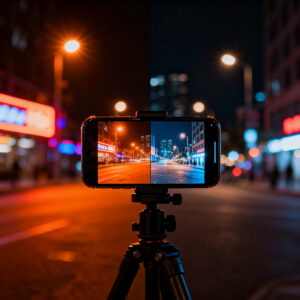
Night modes live under camera app settings, labeled Night, Low Light, Night Sight, or Night mode. A moon icon or brightness slider is common. Pro/Expert modes expose exposure, ISO, and shutter speed for greater control. A live histogram helps avoid clipping highlights or losing shadows. Stabilization features (OIS/EIS) reduce blur, and grid guides help framing. Use a tripod or stable surface when possible. Generative AI in Night Mode: Who Does It Best? A 2026 Flagship Battle for Image Perfection
Manual exposure and RAW capture
Manual exposure lets you set shutter speed, ISO, and sometimes aperture. Slower shutter captures more light but risks motion blur; stabilize your subject or use a tripod. Start with ISO around 800 and adjust as needed. Pair longer exposure with a steady hold for better results than pushing brightness with high ISO.
RAW capture provides unprocessed sensor data for deeper editing. RAW plus JPEG offers quick sharing and a flexible file for post-processing. You’ll often correct white balance and noise in editing. Generative AI in Night Mode: Who Does It Best? A 2026 Flagship Battle for Image Perfection
Night mode image generation tools
Night mode generation tools synthesize more light from the sensor data. They combine frames, align them, and apply smart denoising for cleaner, more detailed results than a single exposure. Compare standard shots to night mode versions to see how details hold in shadows and highlights. Some tools push color, so you may adjust saturation afterward. If your phone supports Generative AI in Night Mode, you’ll see options that promise even more detail and clarity. Review results critically, as AI can oversmooth skin or alter ambient colors. Use it as a helper, not a replacement for solid shooting technique. Generative AI in Night Mode: Who Does It Best? A 2026 Flagship Battle for Image Perfection
Best practice tips for users
- Keep your camera steady with a tripod or stable surface.
- Start with a lower ISO and longer shutter (e.g., 1/8s at ISO 800) and adjust.
- Shoot RAW plus JPEG when possible.
- Compare Night mode with and without AI tweaks.
- Watch white balance in mixed lighting to keep skin tones natural.
- Avoid over-editing; subtle corrections beat heavy filtering.
- Practice in varied low-light scenarios.
- If motion is involved, lock exposure on the subject or use a shorter shutter.
Common artifacts in night mode images
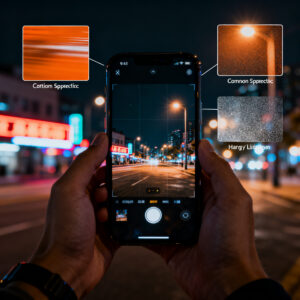
Night mode can reveal artifacts like texture loss, hallucinated details, color shifts, halos, and ghosting. Understanding these helps you capture cleaner shots and reduces post-processing headaches.
Hallucinated details and texture loss
In dark areas, the camera may fill in textures, smoothing brick or fabric. You might also see extra lines or shapes that weren’t there. Lowering exposure slightly or using a mode that preserves natural lighting can reduce this.
Texture loss isn’t always bad; it can help in very dark corners by smoothing noise. If you plan to crop or print, you may want more real texture. Smaller details suffer more than larger shapes; review shots with zoom to spot issues.
Color shifts, halos and ghosting
Night mode often produces blue-tinted shadows, warm highlights, or halos around bright lights. Ghosting occurs when bright spots spill into surrounding areas. These artifacts aren’t fatal but can be noticeable when aiming for realism.
How to spot and avoid errors
Zoom in and compare shots to check texture, avoid hallucinated shapes, and verify color accuracy. If results look off, adjust exposure, try a mode that preserves natural light, or shorten the shutter for static scenes. Sometimes a little noise is preferable to fake detail.
Privacy and data flow in AI night modes
Night modes can blur or enhance pictures using AI, which may involve data movement to servers. You should know what is sent, who sees it, and how it’s used. Some features run on-device, preserving more privacy but sometimes offering less aggressive enhancements. Review app permissions and privacy controls to balance magic with privacy.
What data apps may send off device
Some features request camera frames, location, device identifiers, or usage data to improve models or provide effects. Your photos could be uploaded to servers for lighting, contrast, or noise reduction. Metadata like time and place might travel as well. Review permissions and privacy policies, and disable data sharing you don’t need.
On-device AI and local processing
On-device AI keeps data local, reducing privacy risks. It may trade off some speed or depth of enhancement, but many users value privacy enough to enable local processing. If you don’t see the option, limit background data and disable cloud syncing for night-mode features.
Settings and privacy checks
Audit privacy and AI options in camera or app settings. Turn off automatic cloud processing if possible. Disable improve AI or send usage data unless needed. Review location access and metadata handling, and update permissions after app updates.
How to compare flagship night mode AI 2026
When comparing flagship night mode AI in 2026, look for how Generative AI in Night Mode: Who Does It Best? A 2026 Flagship Battle for Image Perfection performs in real use, not just specs. Consider shadow brightness, color fidelity, edge preservation, and motion handling. Also evaluate battery impact and processing speed. A good AI should improve quality without making scenes look unrealistic.
Side-by-side shooting checklist
- Shoot the same scene with both devices in the same lighting.
- Compare exposure, color accuracy, noise, and texture preservation.
- Test motion and stabilization in video and stills.
- Assess dynamic range and color consistency across indoor and outdoor scenes.
- Evaluate battery impact and processing speed.
Look for consistent AI image perfection night mode
A top-performing phone should give reliable, natural results across scenes. Shadows should stay natural, portraits maintain skin tones under mixed lighting, and backgrounds remain believable without looking rendered. A strong night mode AI preserves texture and minimizes noise, even under challenging lights like street lamps or neon.
Generative AI in Night Mode: Who Does It Best? A 2026 Flagship Battle for Image Perfection
Generative AI in Night Mode is pushing flagship phones toward true-to-life low-light photography. The 2026 comparisons weigh how well AI reduces noise, preserves edge detail, and maintains color accuracy across street scenes, interiors, and neon-lit facades. The best systems minimize artificial glow and avoid plasticky looks, delivering natural results with balanced brightness and texture.
Side-by-side flagship night mode AI test results
When evaluating flagship devices, prioritize consistent results across varied environments, not just glamorous demos. The best models reduce noise without flattening texture, preserve color fidelity, and keep motion blur in check. Battery life and processing speed matter too—the ideal AI enhances photos quickly without excessive heat or drain.
How to compare flagship night mode AI 2026
Test both stills and short clips in low light. Observe how models handle shadows, highlights, and color under mixed lighting. Note edge preservation, texture retention, and whether the AI ever introduces halos or color casts. Consider long-term use: software updates can shift performance, so factor in device aging and support.
Side-by-side shooting checklist
- Shoot the same scene on two devices in identical lighting.
- Check exposure, color accuracy, noise, and texture preservation.
- Test stabilization and motion handling in video.
- Compare dynamic range and color consistency across scenes.
- Assess battery drain and processing speed.
Look for consistent AI image perfection night mode (final note)
Seek a phone that delivers dependable, natural results across scenes. Balanced shadows, healthy skin tones, preserved textures, and minimal noise signal a mature night mode AI. The best result feels effortless—the image looks real, not engineered. Generative AI in Night Mode: Who Does It Best? A 2026 Flagship Battle for Image Perfection

Smartphone Night Photography Enthusiast & Founder of IncrivelX
Vinicius Sanches is a passionate smartphone photographer who has spent years proving that you don’t need an expensive camera to capture breathtaking images after dark. Born with a natural curiosity for technology and a deep love for visual storytelling, Vinicius discovered his passion for night photography almost by accident — one evening, standing on a city street, phone in hand, completely mesmerized by the way artificial lights danced across wet pavement.
That moment changed everything.
What started as a personal obsession quickly became a mission. Vinicius realized that millions of people were carrying powerful cameras in their pockets every single day, yet had no idea how to unlock their true potential after the sun went down. Blurry shots, grainy images, and washed-out colors were robbing everyday people of memories and moments that deserved to be captured beautifully.
So he decided to do something about it.
With years of hands-on experience shooting city streets, starry skies, neon-lit alleyways, and creative night portraits — all with nothing but a smartphone — Vinicius built IncrivelX as the resource he wished had existed when he was just starting out. A place with no confusing jargon, no assumptions, and no gatekeeping. Just honest, practical, beginner-friendly guidance that actually gets results.
Vinicius has tested dozens of smartphones from every major brand, explored dark sky locations across multiple states, and spent countless nights experimenting with settings, compositions, and editing techniques so that his readers don’t have to start from scratch. Every article on IncrivelX comes from real experience, real mistakes, and real lessons learned in the field.
When he’s not out shooting at midnight or writing in-depth guides for the IncrivelX community, Vinicius can be found exploring new cities with his phone always within reach, looking for the perfect shot hiding in the shadows.
His philosophy is simple: the best camera is the one you already have — you just need to learn how to use it in the dark.